
Who's coming when? Everything is visible, so there are no misunderstandings.
No more clashing dates, just family harmony. A shared calendar where every member sees availability, books their stay, room and bed, and gets a confirmation. No WhatsApp, no spreadsheets.
Get started for free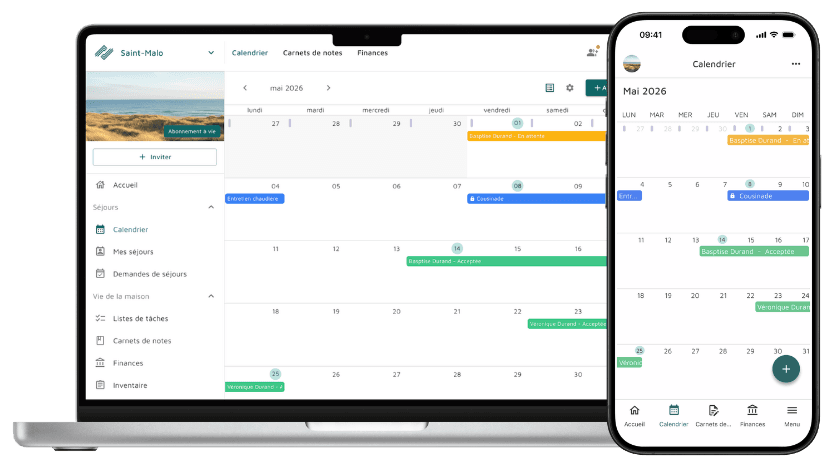
What it changes in practice
Three views to see everything at a glance
Month view for the big picture, schedule view for a chronological list of stays, day view for the details. No more "Is the house free this weekend?" messages.
One colour per member
Every member has their own colour. Filter the calendar by member in a tap, and instantly spot stays still pending approval.
School holidays, bank holidays and birthdays
School holidays and bank holidays are shown automatically based on your area. Members' birthdays appear in the calendar too.
Available on your phone, tablet or computer
Cazmate works on iOS, Android and in your web browser. The calendar syncs in real time across all devices, wherever you are.
How it works
Pick your dates
Choose your dates, add who's coming with you, pick the rooms and beds, and leave a short note for the other members.
Approval, if you want it
If stay approval is turned on, an admin or a member with the "Calendar" role approves it in one click, or the stay is approved automatically after a set time.
Everyone is kept in the loop
The stay shows up straight away on every member's calendar. No more confusion.
Rooms and beds
The calendar doesn't just handle dates: it also knows who sleeps where.
Your rooms, set up once
Create the house's rooms with their capacity, then add the beds in each one.
Everyone knows where they're sleeping
When you book a stay, choose the rooms and beds. No more haggling on arrival: everyone knows where they're sleeping.
Stay rules, if you need them
The admin only turns on the rules that suit your house. They are all optional and free.
Stay approval
Stays are approved by an admin, or approved automatically after a set time.
Limited advance booking
Set how many months ahead people can book.
Maximum stay length
Limit the number of nights per stay so everyone gets their turn.
Cancellation deadline
Decide how late a stay can be cancelled.
Room availability
A room already taken on those dates: just a warning, or the booking is blocked. It's up to you.
Rules everyone can see
Every member sees the rule when they book. No surprises, no misunderstandings.
There's more
The Cazmate calendar goes beyond simple bookings: cost contributions, shared events, personal calendars, guests. All of house life in one place.
A contribution towards stays
Set a price per night, or per night and per person, with periods (high and low season…). When a paid stay is approved, a contribution is automatically created in the house's finances and split between the participants.
Shared events
Family get-together, building work, an 80th birthday party: create shared events, which can also block out a period.
Your stays in your personal calendar
Subscribe your Google, Apple or Outlook calendar to the house calendar via iCal: your stays appear there automatically. Free.
Sync with external calendars
Import bookings from external calendars (iCal, Airbnb…) to avoid double bookings. Premium feature.
Guests request their stay
A guest can request a stay. They see which periods are already taken, without seeing who booked them.
Delegated approval
Stay approval can be handed to a member with the delegated "Calendar" role, to take some load off the admin.
The house guestbook
Every stay leaves its mark. Memories, photos, stories: a shared memory that the whole family and your guests add to.
Memories as a feed
Memories appear as a feed, each linked to a stay and illustrated with photos. The house's memory, stay after stay.
You choose who sees it
For each memory, choose whether it's visible to all members and guests, or to members only.
Guests are free to contribute
Your guests can write in the guestbook. Their memory is automatically linked to their stay.
Frequently asked questions
Can every member book?
Yes. Every member can book a stay and choose their rooms and beds. Guests can request a stay.
Do stays have to be approved?
Only if you want them to be. Stay approval is optional: it's done by an admin or a member with the delegated "Calendar" role, and can also happen automatically after a set time.
Do stay rules cost extra?
No. Stay rules (approval, advance booking, maximum length, cancellation deadline, room availability) are free and optional. The admin turns them on according to the house's needs.
Can I see my stays in Google Calendar or Apple Calendar?
Yes. Subscribe your personal calendar (Google, Apple, Outlook) to the house calendar via iCal. It's free.
Can the calendar sync with external calendars?
Yes, with the Premium plan. Cazmate imports bookings from external calendars (iCal, Airbnb…) so they show up in the house calendar. No more risk of double bookings.
How many stays can we create?
As many as you like, with no limit.
More questions? Check out our full FAQ
Ready to put an end to scheduling clashes?
Free for your first house, no credit card needed.
Get started for free